
Alternate format: Smishing: Protect yourself from SMS attacks - ITSAP.00.103 (PDF, 828 KB)
Smishing is a type of phishing scam. Threat actors use social engineering to send fraudulent text messages (SMS) to trick victims into revealing sensitive information, such as login credentials or banking details. The text messages use language that creates a sense of urgency in an attempt to force the recipient to act fast. Smishing messages may link to malware or fake websites, allowing threat actors to steal your data, money or identity.
This publication was written in collaboration with the Royal Canadian Mounted Police to raise awareness on the identification, reporting and mitigation of smishing scams.
On this page
How threat actors leverage smishing
Modern smishing techniques enable threat actors to spoof the sender’s phone number, making the message appear to come directly from a well known organization you trust. For example, if threat actors spoof your bank’s legitimate short code, the fraudulent messages will appear in the same chat thread as any legitimate communications you may have had with your bank in the past. This continuation of the conversation makes it very difficult to distinguish fraudulent messages from valid messages.
Tips for spotting a smishing message
Although the sender's name and number may appear legitimate in a smishing message, there are common warning signs to watch for, including:
- urgent claims about accounts being "locked" or "compromised"
- suspicious links using URL shorteners or slightly altered web addresses
- requests for sensitive information such as passwords, PINs, or SINs
These are all details that legitimate organizations would not request through text messages.
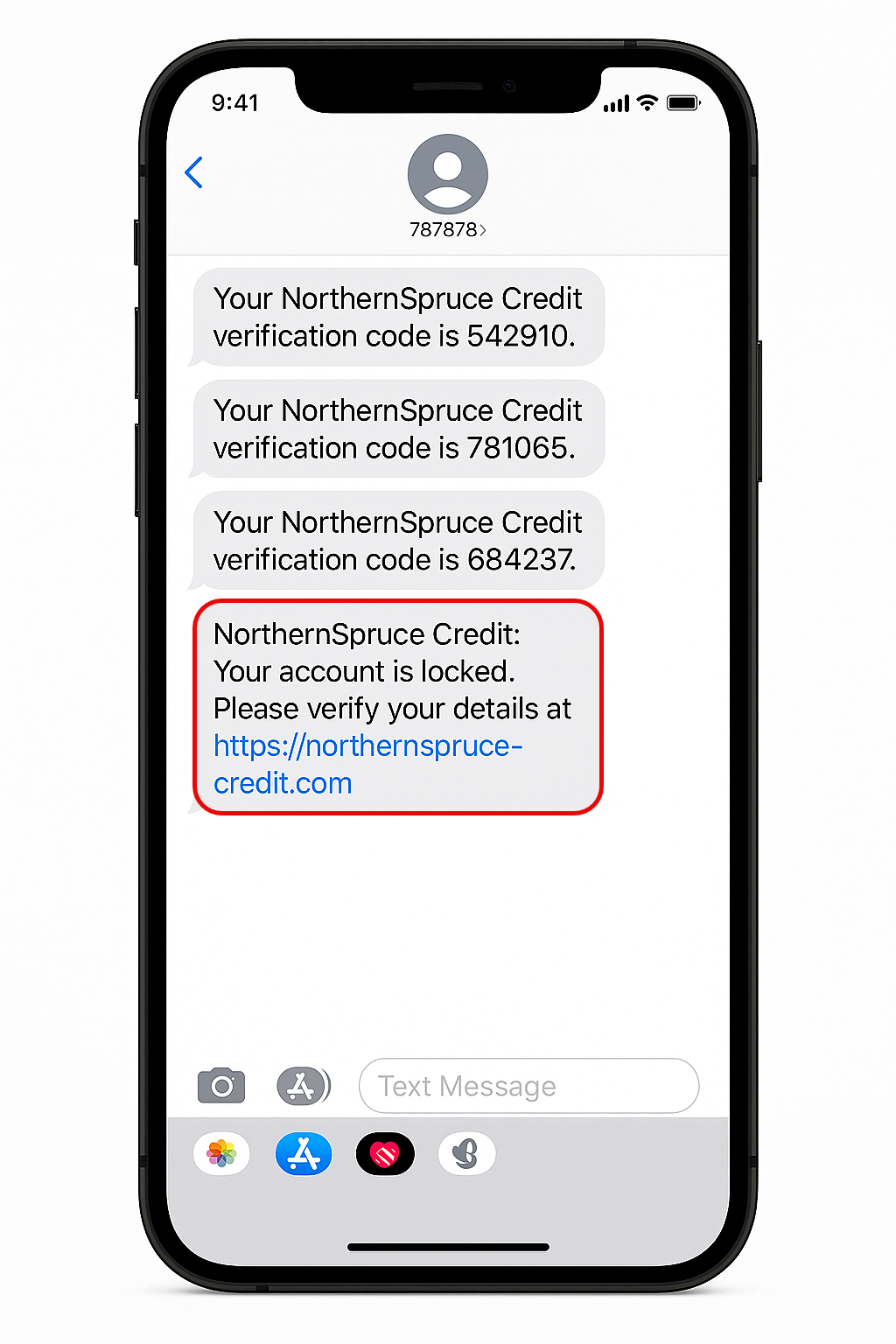
Long description - Figure 1: Example of a smishing message
Example of a smishing message depicts four examples of SMS messages received on a cell phone. The messages all appear to come from the same financial institution, but the one circled is a Smishing message. The image highlights that when threat actors spoof a bank’s legitimate short code, fraudulent messages appear in the same chat thread as legitimate communications you may have had with this bank in the past. This continuation of the conversation makes it very difficult to distinguish fraudulent messages from valid messages. The smishing message includes a hyperlink intended for the user to click, which will lead to an illegitimate website that will attempt to steal sensitive information.
Protect yourself from smishing
To protect yourself from smishing attacks, follow these recommended mitigation strategies.
Do not click links
Do not click links received by SMS message. If you receive an urgent message or a message with a suspicious or unusual link, pause before reacting. Scammers rely on impulsive reactions. Navigate to the organization's official online portal using your browser or official mobile app.
Verify independently
If a message appears in a legitimate message thread (for example, from your bank), call the number on the back of your debit or credit card to verify the request. Do not call the number provided in the text.
Report the spam
Forward the suspicious SMS to 7726 (SPAM) or use the messaging applications spam reporting function. You can also report the spam to the Canadian Anti-Fraud Centre. This will notify the appropriate organizations to initiate an investigation and take appropriate actions.
Enable multi-factor authentication
Ensure MFA is enabled on your accounts to prevent unauthorized access even if credentials are stolen. Whenever possible, choose MFA options that do not rely on SMS like an authenticator app, or options that are phishing-resistant such as passkeys, or hardware tokens.
Disable 2G
If your phone allows it, turn off 2G in the settings. This can help prevent your phone from connecting to a false base station operated by a threat actor.
Stay updated
Keep your device’s software current and enable SMS spam protection.
Delete suspicious messages
If the suspicious sender is a new number, block it. Delete suspicious messages to avoid accidentally clicking the link.
Learn more
- Smishing: An introduction
- Don't take the bait: Recognize and avoid phishing attacks (ITSAP.00.101)
- Phishing: Don't get reeled in
- The 7 red flags of phishing
- Fact sheet: Phishing
- Three common types of phishing scams
- Using your mobile device securely (ITSAP.00.001)
- Reporting spam text messages to 7726